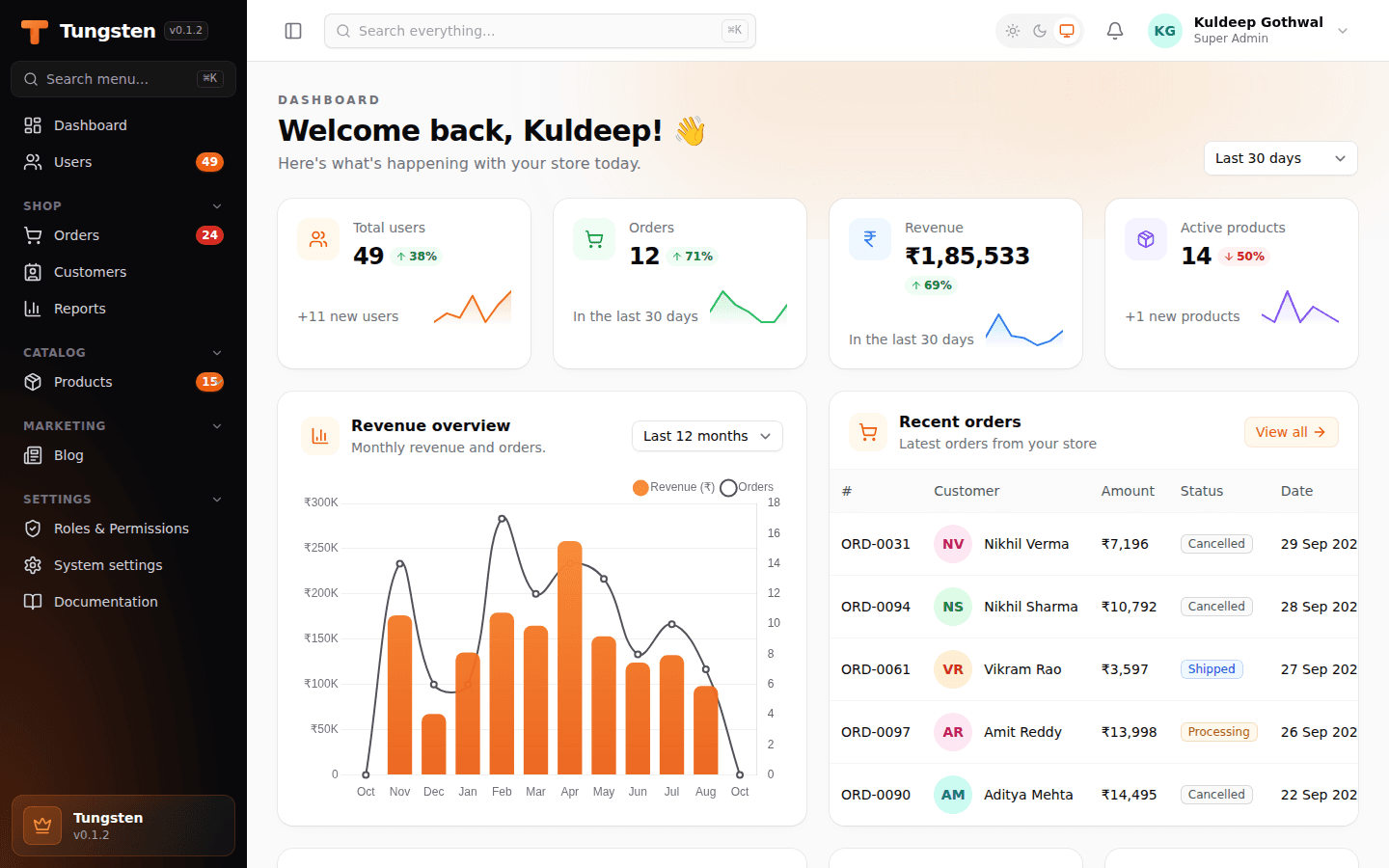
Tungsten is a free, open-source admin panel for FastAPI. Describe your model once in Python and get forms, tables, dashboards, login and roles — with no JavaScript to write.
Every web app needs an admin panel. Your team needs a place to add products, check orders, manage users and see numbers on a dashboard. If your backend is built with FastAPI, building this panel by hand can take weeks. You write forms, tables, search, filters, login, roles and a lot of front-end code.
That is why we built Tungsten, a free and open-source FastAPI admin panel. You describe your model once in Python, and Tungsten gives you list, create, edit and view pages with search, filters, bulk actions, dashboards, login and roles. You write no JavaScript.
In this guide, we explain what Tungsten is, what you get, how to install it, and when it is the right choice for your project.
What Is Tungsten?
Tungsten is a Filament-style admin panel builder for FastAPI. If you have used Filament in the Laravel (PHP) world, the idea will feel familiar: you write small Python classes called resources, and the full admin screens are created for you.
- Server-rendered: Pages are made on the server with Jinja2 templates.
- No JavaScript to write: HTMX and Alpine.js handle the browser side for you.
- Works with your models: It supports SQLAlchemy 2.0 models, and SQLModel models work too.
- Sync or async: Use a normal SQLAlchemy engine or an async one.
- Free and open source: Released under the MIT license on GitHub and PyPI.
Why FastAPI Projects Need a Ready-Made Admin Panel
FastAPI is great for fast, modern APIs. But it does not come with an admin panel like Django does. So most teams either build one from scratch or skip it and edit the database directly. Both choices cost time and add risk.
A good admin panel should give you:
- Clean tables with search, sort, filters and pagination
- Forms with validation and clear error messages
- Safe login, roles and permissions
- A dashboard with key numbers and charts
- Import and export for bulk data work
Tungsten gives you all of this out of the box, so your developers can focus on the product, not on internal tools. If you need something more tailored, our custom development services can extend it for your exact workflow.
Key Features of Tungsten
| Area | What you get |
|---|---|
| Resources | List, create, edit and view pages from one class. Soft delete with restore. |
| Forms | Text, select, toggle, date pickers, file upload, rich editor, tags, repeater and more. |
| Layouts | Sections, grids, tabs and step-by-step wizards. |
| Tables | Search, sort, filters, a query builder, tabs with counts, row and bulk actions, grouping and totals. |
| Dashboards | Stats cards with trends, line, bar and pie charts, and table widgets. |
| Auth & roles | Login, sign-up, password reset, two-factor login and role-based permissions. |
| Relations | Manage a customer's orders or a product's tags right on the record page. |
| Languages | Every screen can be translated. Hindi ships built in. |
| Extras | CSV/Excel import and export, dark mode, ⌘K global search, multi-tenancy and plugins. |
How to Install Tungsten
Tungsten needs Python 3.10 or newer. Install it with pip:
pip install tungsten-adminAdd [excel] for Excel import and export, or [async] if you use an async database engine.
Build Your First FastAPI Admin Panel in Minutes
Step 1: Describe a resource
A resource tells Tungsten which model to show, which form fields to use and which table columns to list:
class ProductResource(Resource):
    model = Product
    icon = "package"

    @classmethod
    def form(cls, form):
        return form.schema([
            TextInput("name").required().max_length(150),
            Select("category_id").relationship("category", "name").searchable(),
            TextInput("price").numeric().prefix("₹"),
            Toggle("is_featured"),
        ])

    @classmethod
    def table(cls, table):
        return (
            table.columns([
                TextColumn("name").searchable().sortable(),
                TextColumn("category.name").badge(),
                TextColumn("price").money("INR").sortable(),
            ])
            .filters([SelectFilter("category").relationship("category", "name")])
            .actions([EditAction(), DeleteAction()])
            .bulk_actions([DeleteBulkAction()])
        )
Step 2: Create the panel and mount it
panel = Panel(
    path="/admin",
    session_factory=SessionLocal,
    secret_key="change-me",
    auth=Auth(User),
    brand_name="Acme",
    colors={"primary": "orange"},
)
panel.resources([ProductResource, OrderResource])
panel.rbac()
panel.create_tables(engine)

app = FastAPI()
panel.mount(app)
Step 3: Create your first admin user
tungsten make:user --panel app.admin:panel --role "Super Admin"Now open /admin in your browser and sign in. You have a working admin panel with login, a sidebar, tables and forms. When you are ready to go live, our DevOps services can help you deploy it safely.
Who Should Use Tungsten?
- Startups that need an internal dashboard fast, without hiring a front-end team.
- Python teams that already use FastAPI and SQLAlchemy and want to stay in one language.
- Agencies that build client back offices, CRMs, order management systems or inventory management tools.
- Indian businesses that need INR money formats and Hindi screens out of the box.
Tungsten vs Building an Admin Panel From Scratch
| Build from scratch | Tungsten | |
|---|---|---|
| Time to first screen | Days or weeks | Minutes |
| Front-end code | React, Vue or custom JS | None to write |
| Login, roles, 2FA | Build and test yourself | Built in |
| Import / export | Extra work | Built in |
| Cost | Developer hours | Free (MIT license) |
Tungsten is for your admin side. For your public website, you still need to pick the right stack. Our guide on choosing between React and WordPress can help you decide.
Try the Demo
The project ships with a shop demo that has users, products, orders, customers, roles, a settings page and a full dashboard. Clone the repo, run the seed script and start the app to explore it. You can find full steps and docs on the Tungsten website.
Frequently Asked Questions
What is Tungsten?
Tungsten is a free, open-source, Filament-style admin panel builder for FastAPI. You describe a model once in Python and get list, create, edit and view pages with search, filters, bulk actions, dashboards, login and roles.
Does FastAPI have a built-in admin panel?
No. FastAPI does not ship with an admin panel like Django does. Tools like Tungsten add a full admin panel to a FastAPI app with a few lines of Python.
Do I need to write JavaScript to use Tungsten?
No. Tungsten renders pages on the server with Jinja2 and uses HTMX and Alpine.js in the browser, so you write only Python.
Which databases and models does Tungsten support?
Tungsten works with SQLAlchemy 2.0 models and SQLModel models, using either a normal or an async SQLAlchemy engine.
How do I install Tungsten?
Run pip install tungsten-admin. It needs Python 3.10 or newer. Add [excel] for Excel import and export or [async] for async engines.
Is Tungsten free for commercial use?
Yes. Tungsten is released under the MIT license, so you can use it in personal and commercial projects for free.
Need Help Building Your Admin Panel?
Tungsten is made by the team at Prism Infoways. We build custom web apps, dashboards and enterprise back-office tools for businesses in Gurugram and across India. If you want us to set up Tungsten for your project, or build a fully custom admin system, our web development team and software development consultants can help.
See our portfolio, browse all our services, or contact us to talk about your project.
Related Reading
- Web Development Company in Gurugram: How to Choose the Best One in 2026
- Choosing Between React and WordPress for Your Business Website
- Ecommerce Website Development in Gurugram: Cost & Process
- 5 Software Development Trends Shaping 2026
Conclusion
If you use FastAPI, you no longer need to spend weeks building an admin panel. With Tungsten, you describe your models in Python and get a clean, secure and fast admin panel with forms, tables, dashboards, login and roles. It is free, open source and ready to use today.
Get started: pip install tungsten-admin and visit tungsten.prisminfoways.com.
Need Expert IT Solutions?
Ready to transform your business? Team up with Prism Infoways and harness cutting-edge technology for your growth.
Contact Us