PHP2Shell is a pair of critical PHP flaws that let hackers take over a web server without logging in. AI helped find them. Here is what happened and how to fix your site today.
Quick answer: PHP2Shell is the nickname for two critical PHP vulnerabilities, CVE-2026-109618 and CVE-2026-109619. They let a hacker run their own code on a web server without logging in. To fix it, update PHP to 8.5.12, 8.4.27, 8.3.36 or 8.2.35 (or your Linux vendor's patched package), then restart PHP. If you use shared hosting, ask your hosting company to confirm the patch today.
PHP runs a huge part of the internet, including WordPress, Drupal, Laravel, Filament admin panels and many custom business websites. So when a flaw this serious shows up in PHP itself, almost every business with a website needs to check its server. Below we explain what happened, who found it, how AI was used, and exactly how to stay safe.
What Is the PHP2Shell Vulnerability?
PHP2Shell is not one bug but two, found in the core of PHP. Both are rated critical: PHP scores them 9.2 on CVSS 4.0, and the US National Vulnerability Database (NVD) scores them 9.8 on CVSS 3.1.
- What an attacker can do: run any code on your server (this is called Remote Code Execution, or RCE). That can mean stealing customer data, adding malware, or taking the whole site down.
- Login needed? No. A specially made web request is enough.
- Who is affected: PHP installations that serve web requests, which includes common setups like PHP-FPM, Apache mod_php, php-cgi, LiteSpeed and FrankenPHP, on versions older than the fixed releases.
- Fix released: October 21, 2026.
What Happened: The PHP2Shell Timeline
| Date | What happened |
|---|---|
| July–August 2026 | Security firm Calif (with help from an OpenAI model) and Google-owned Wiz separately found the flaws and reported them privately to PHP. |
| October 20, 2026 | Details leaked before the planned disclosure date. PHP published an advance notice and CERT-EU issued an advisory. |
| October 21, 2026 | PHP released fixed versions 8.5.12, 8.4.27, 8.3.36 and 8.2.35. The US NSA and Europe's cyber security agency asked companies to act immediately. |
| October 21–22, 2026 | Some websites, including in the Netherlands, went offline for a short time while fixes were applied. Reports of attack attempts started appearing. |
Who Found PHP2Shell, and How Did AI Help?
This is the part that made global news. PHP2Shell was found with AI models working alongside human security researchers.
- Calif + OpenAI: Security firm Calif found the first issue using OpenAI's GPT-5.6 Sol model. Calif then told OpenAI, which dug deeper and found more parts of the bug.
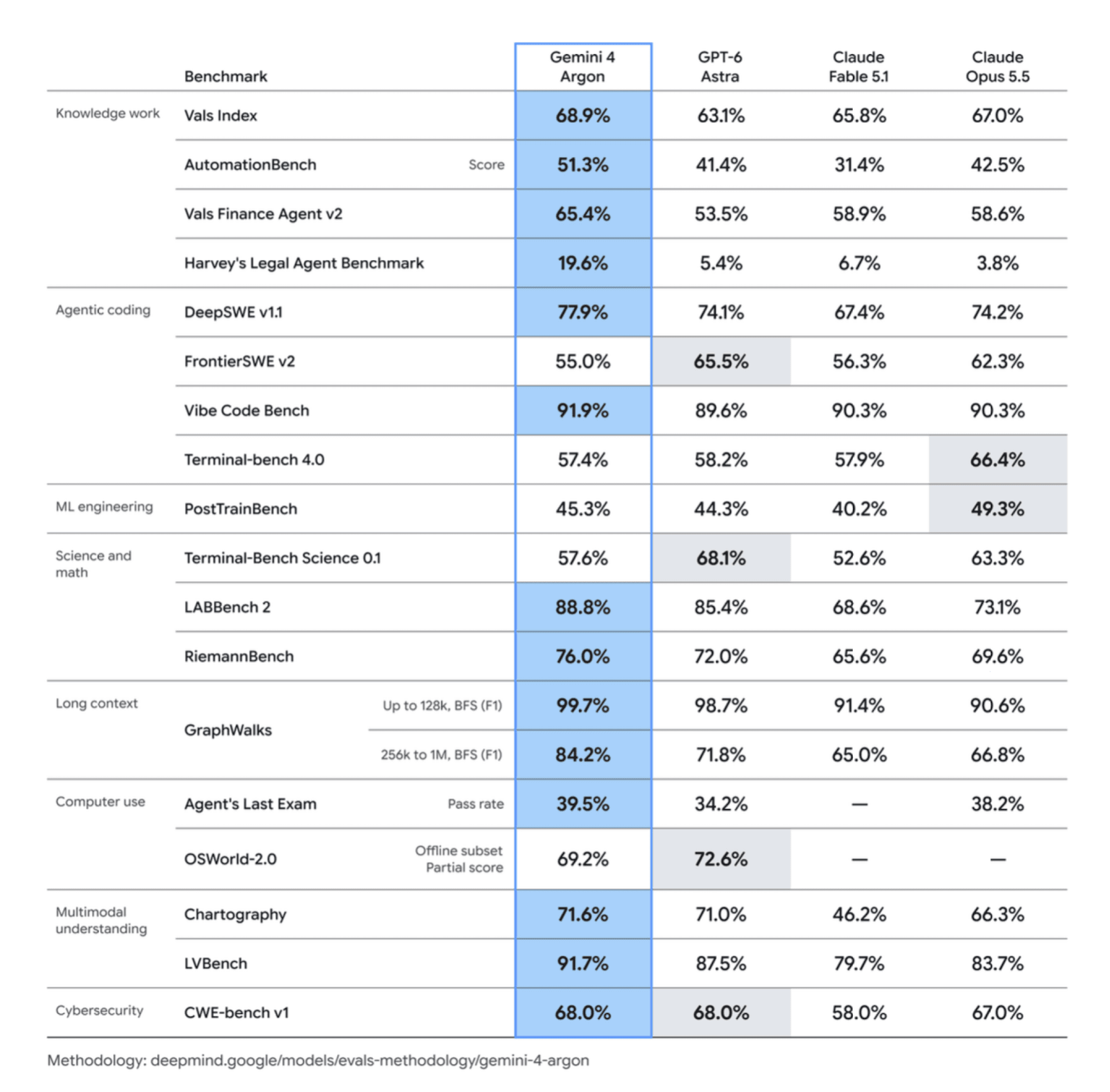
- Wiz (owned by Google): Wiz's team found the flaws on its own, using its Wiz Atlas security agent along with Gemini 4 Argon and GPT-5.6 Sol. (Curious about these models? Read our Gemini 4 Argon vs GPT-6 Astra vs Claude comparison.)
- Hidden for 14 years: According to OpenAI's Greg Brockman, the bug had been sitting in PHP for about 14 years.
All teams followed responsible disclosure. They worked quietly with the PHP team so that patches were ready before details became public.
Why this matters: AI cuts both ways
Wiz pointed out that these bugs were very hard to exploit before. Now, AI can help an attacker adapt an exploit to different PHP versions and server setups. In simple words: AI helped defenders find the flaw first, but AI also makes it easier for hackers to use it. That is why "patch later" is no longer safe. The gap between a fix and an attack is now very small.
This is not the first time either. Earlier in 2026, a WordPress core flaw called "wp2shell" was also found with AI help, and attackers started using it within a day of disclosure.
Which PHP Versions Fix PHP2Shell?
| PHP branch | Fixed version | Official support |
|---|---|---|
| PHP 8.5 | 8.5.12 | Active support |
| PHP 8.4 | 8.4.27 | Active support till Dec 31, 2026 |
| PHP 8.3 | 8.3.36 | Security fixes only |
| PHP 8.2 | 8.2.35 | Security fixes only till Dec 31, 2026 |
| PHP 8.1, 8.0, 7.x and older | No official fix from php.net | End of life. Use a vendor backport or upgrade |
Important for Ubuntu and Debian users: Linux vendors often fix the bug without changing the main version number. For example, Ubuntu 24.04's package 8.3.6-0ubuntu0.24.04.13 is already fixed even though it still says "8.3.6". So check your vendor's security notice, not just the number.
How to Fix PHP2Shell: Step-by-Step
Step 1: Check your PHP version
On your server, run php -v. On shared hosting, check the PHP version in your hosting panel (cPanel, Plesk, Hostinger hPanel, etc.). If you are not sure who has server access, our website handover checklist explains which logins you should own.
Step 2: Update PHP
- Ubuntu / Debian:
sudo apt update && sudo apt upgrade - AlmaLinux / Rocky / RHEL:
sudo dnf update 'php*' - Docker: pull the latest official PHP image tag for your branch and rebuild your containers.
- Shared hosting / managed hosting: raise a support ticket and ask: "Is PHP2Shell (CVE-2026-109618 and CVE-2026-109619) patched on my server?"
Always download PHP only from php.net or your official Linux vendor, not from random links shared on social media.
Step 3: Restart PHP
The old, unsafe code keeps running until PHP restarts. Restart PHP-FPM (for example sudo systemctl restart php8.3-fpm) or Apache (sudo systemctl restart apache2). Then run php -v again to confirm.
Step 4: Stuck on PHP 8.1 or older? Plan an upgrade
Old PHP versions will not get an official fix. Some vendors such as Ubuntu, AlmaLinux and TuxCare have released backported patches, so check with them. But the real long-term fix is moving to PHP 8.3 or newer. Our web development team can upgrade old PHP and WordPress sites without breaking them.
Step 5: Use a temporary shield only if you cannot patch today
Security advisories mention setting session.upload_progress.enabled = 0 in php.ini to block the path used in the known attack on CVE-2026-109619. This is only a stop-gap. It does not fully fix both bugs. Patch as soon as you can.
Step 6: Check if you were already attacked
- Look for new or unknown
.phpfiles in upload folders. - Check for new admin users in WordPress or your CMS.
- Review server logs for strange requests from October 20 onwards.
- Searchlight Cyber has released a free open-source tool, php2shell-scanner, that checks whether a host is exposed.
- Change passwords and API keys if anything looks suspicious.
Quick Safety Checklist for Business Owners
- PHP updated to a fixed version (or vendor-patched package)
- PHP and web server restarted
- WordPress core, plugins and themes updated
- Fresh, tested backup taken
- No unknown files or admin users found
- Hosting company or developer has confirmed in writing
Running an online store or a lead-generation site? A single hack can mean lost orders, leaked customer data and Google warnings. Read our guide on how to protect your business from cyber attacks for a bigger security plan.
Using a Laravel Filament Admin Panel? Read This
Many businesses run their CRM, inventory or order dashboards on Laravel Filament. Filament runs on PHP, so every Filament panel on an unpatched server is open to PHP2Shell. On top of that, Filament has also had its own security advisories in 2026:
| CVE | What it is | Severity | Published |
|---|---|---|---|
| CVE-2026-55409 | XSS through a disabled RichEditor field | High | June 2026 |
| CVE-2026-77567 | App-based MFA could be bypassed when recovery codes are on | High | August 2026 |
| CVE-2026-84306 | MFA codes could be reused for a few minutes (fixed in 4.12.6 and 5.7.6) | Medium (6.5) | September 2026 |
| CVE-2026-84307 | Login could reveal if a password is valid for accounts blocked from the panel | Low | September 2026 |
To be fair, the Filament team released fixes for these, and none is listed as exploited in the wild. But it shows the real cost of a PHP admin panel today: you must patch PHP, Laravel and Filament, and in an emergency like PHP2Shell, you have to do it fast.
If you stay on Filament: patch PHP first (steps above), then run composer update to get the latest Filament release, and turn on email or app MFA only after updating.
Why Tungsten Admin Is a Safer-by-Design Filament Alternative
Tungsten Admin is our free, open-source admin panel builder for Python and FastAPI. It gives you the same Filament-style forms, tables and dashboards, but on a different stack.
- No PHP in the stack: Tungsten runs on Python, so PHP2Shell and other PHP core bugs do not apply to it. That is one less layer to rush-patch at midnight.
- Move from Filament in one command: the tungsten-filament migration tool keeps your same database and same user passwords, and gives a clear report of anything left to move.
- Feature match with Filament: themes, form masks, wizard modals, API tokens, activity log and background exports. See the Filament parity update.
- Built-in security and SEO audit: a one-click security audit plugin flags weak settings inside your panel.
- Backups ready for bad days: the backups plugin makes private, SHA-256 checked backups of PostgreSQL, MySQL or SQLite, on a schedule.
- Safe "log in as user": the impersonate plugin has role rules, a 60-minute limit and a full audit log.
- No live-site accidents: the environment indicator clearly shows Local, Staging or Live.
- AI-ready: the MCP plugin lets Claude and Cursor work in your panel with OAuth login, roles respected and secrets hidden.
Honest note: no software is bug-free, and Tungsten also needs Python and package updates. The advantage is a modern, smaller stack where one PHP emergency cannot take your whole admin panel down.
Want to move your Filament panel off PHP? Ask us for a free Filament-to-Tungsten migration check.
Need Help Fixing PHP2Shell? Talk to Prism Infoways
Not sure if your website is safe? Prism Infoways, based in Gurugram, Haryana, can check your server, update PHP safely, clean up any infection and set up monitoring so you hear about the next threat before hackers do.
- Free PHP2Shell exposure check for your website
- Safe PHP and WordPress upgrades with backup first
- Filament panel patching or migration to Tungsten
- Malware scan and clean-up
- Ongoing security monitoring
Book your free website security check today, or explore our cybersecurity services. You can also WhatsApp us at +91-8062177080.
Frequently Asked Questions
What is PHP2Shell?
PHP2Shell is the name for two critical PHP flaws, CVE-2026-109618 and CVE-2026-109619, that let a hacker run code on a web server without logging in.
Which PHP versions are safe from PHP2Shell?
PHP 8.5.12, 8.4.27, 8.3.36 and 8.2.35, released on October 21, 2026, fix both flaws. Linux vendors also offer patched packages that may keep an older version number.
Who found the PHP2Shell vulnerability?
Security firm Calif found the first issue using OpenAI's GPT-5.6 Sol, and OpenAI found more parts of it. Google-owned Wiz found the flaws on its own using AI tools including Gemini 4 Argon.
Is my WordPress website affected by PHP2Shell?
Yes, if your server runs an unpatched PHP version. PHP2Shell is a bug in PHP itself, not in WordPress, so updating WordPress alone is not enough. You must update PHP on the server.
Is Laravel Filament affected by PHP2Shell?
Yes, if the server runs an unpatched PHP version, because Filament runs on PHP. Update PHP first, then update Filament with Composer to also get fixes for Filament's own 2026 advisories.
Is Tungsten Admin affected by PHP2Shell?
No. Tungsten is a Python and FastAPI admin panel and does not run on PHP, so PHP2Shell does not apply. You should still keep Python and its packages updated.
I use shared hosting. What should I do?
Ask your hosting company to confirm that PHP2Shell is patched on your server. Most good hosts patch quickly, but always get written confirmation.
Is there a fix for PHP 7.4 or PHP 8.1?
php.net does not patch these old versions. Some vendors like Ubuntu, AlmaLinux and TuxCare provide backported fixes. The safest long-term step is upgrading to PHP 8.3 or newer.
Sources
Need Expert IT Solutions?
Ready to transform your business? Team up with Prism Infoways and harness cutting-edge technology for your growth.
Contact Us