Multilingual website losing traffic? One small hreflang mistake could be why. Learn how to fix hreflang errors in simple, step-by-step actions.
Multi-country SEO sounds simple on paper. You launch a version of your website for the UK, another for India, and a Spanish one for Mexico. Then you wait for the traffic to roll in.
But sometimes the opposite happens. UK visitors land on the Indian page. Prices show in the wrong currency. Bounce rates climb and sales slow down.
In many cases, the cause is one tiny mistake: broken hreflang tags. It is easy to miss, yet it can quietly drain your traffic and conversions.
In this guide, you will learn what the mistake is, how to spot it, and how to fix it step by step. No technical background needed.
Quick answer: The most common multi-country SEO mistake is a faulty hreflang setup, usually missing return tags or wrong language-country codes. To fix it, give every page version a matching set of hreflang tags with valid codes, including a tag that points to itself.
What Is Multi-Country SEO?
Multi-country SEO is the practice of optimizing your website so search engines show the right page to the right audience, based on their country and language. It is a key part of international SEO.
Think of it like a shop with several branches. Each branch has its own address, currency, and language. Search engines need clear signals to send every customer to the correct branch.
Multi-Country vs. Multilingual SEO
- Multi-country: Same language, different countries. Example: English pages for the US, UK, and India, each with local prices and spellings.
- Multilingual: Different languages. Example: the same content in English, French, and German.
- Both together: Many businesses need both, such as French for France and French for Canada.
Whichever route you take, hreflang tags are what connect all your versions together.
The Tiny Mistake: Broken Hreflang Tags
What Are Hreflang Tags?
Hreflang tags are small snippets of code. They tell search engines which language and country a page is meant for, and which other versions of that page exist.
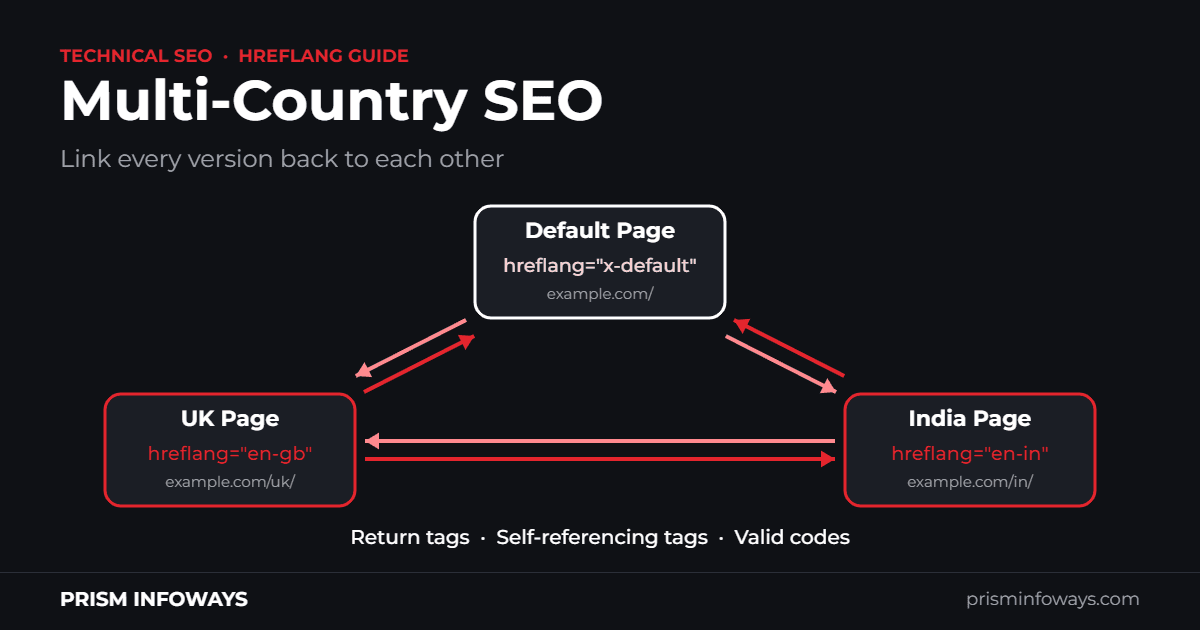
<link rel="alternate" hreflang="en-gb" href="https://example.com/uk/" />
<link rel="alternate" hreflang="en-in" href="https://example.com/in/" />
<link rel="alternate" hreflang="x-default" href="https://example.com/" />
Example: hreflang tags for a UK page, an India page, and a default page.
Why One Small Mistake Causes Big Problems
Search engines treat hreflang as a hint, not a strict command. When your tags are inconsistent, Google may ignore them and guess which version to show.
That guess is often wrong. Your UK page may appear for searchers in India, or your English page may show up for Spanish speakers. Visitors who land on the wrong page often leave quickly.
Common Hreflang Errors That Hurt International SEO
Here are the seven most common hreflang mistakes on multi-country websites:
- Missing return tags. If Page A points to Page B, then Page B must point back to Page A. Without this, search engines may ignore both tags. This is the most frequent error.
- Wrong language or country codes. en-uk is not valid. The correct code is en-gb. Always write the language first, then the country.
- No self-referencing tag. Every page should include a tag that points to itself.
- Broken or redirected URLs. Hreflang should point to live, indexable pages. Avoid 404 pages, redirects, and pages marked noindex.
- Conflicting canonical tags. A canonical tag that points to another language version tells search engines to ignore the current page.
- Relative URLs. Use full addresses starting with https://, not short paths like /uk/.
- Forced IP-based redirects. Automatically redirecting people by location can stop users and search engines from reaching other versions. Show a suggestion banner instead.
How Hreflang Mistakes Reduce Traffic and Conversions
Impact on Traffic
- The wrong version ranks, while the right one stays hidden.
- Similar pages compete against each other instead of supporting each other.
- New markets take longer to gain visibility.
Impact on Conversions
- Wrong currency or shipping details lead to abandoned carts.
- Visitors who cannot read the page simply leave.
- Mismatched contact details or legal information reduce trust.
How to Fix Hreflang Errors on a Multilingual Website: Step-by-Step Guide
Follow these eight steps in order. Here is the short version:
- Map every language and country version.
- Choose the correct codes.
- Add matching tags on every version.
- Add an x-default tag.
- Align your canonical tags.
- Use full, working URLs.
- Pick one method and stay consistent.
- Test, monitor, and fix.
Step 1: Map Every Language and Country Version
Create a simple spreadsheet. List each page, its language, its country, and its URL. This becomes your single source of truth.
Step 2: Choose the Correct Codes
Use a two-letter language code first (ISO 639-1). Add a two-letter country code (ISO 3166-1 Alpha-2) only when you need it. You can use a language on its own, like es, but never a country on its own.
- English (United Kingdom): en-gb (not en-uk)
- English (India): en-in (not en-ind)
- English (United States): en-us (not en-usa)
- Hindi (India): hi-in (not hi-india)
- Spanish (Mexico): es-mx (not es-mex)
Step 3: Add Matching Tags on Every Version
Each page must list all versions, including itself. If your UK page lists the India page, your India page must list the UK page too.
Step 4: Add an x-default Tag
The x-default tag tells search engines which page to show when no version matches the visitor. This is usually a global homepage or a language selector page.
Step 5: Align Your Canonical Tags
Each page should have a canonical tag that points to itself. Never point it to a different language version.
Step 6: Use Full, Working URLs
Check every URL inside your tags. It should use the full https address, load without a redirect, and be open to indexing.
Step 7: Pick One Method and Stay Consistent
You can add hreflang in the page HTML head, in HTTP headers, or in your XML sitemap. Choose the one that suits your site and avoid mixing methods that conflict. For large sites, XML sitemaps are usually easier to manage.
Step 8: Test, Monitor, and Fix
Crawl your site with an SEO tool such as Screaming Frog or Sitebulb. These tools flag missing return tags and invalid codes. Then track traffic and conversions by country in Google Analytics and Search Console.
If your site has hundreds of pages, a professional technical SEO audit can save you weeks of manual checking.
International SEO Best Practices Beyond Hreflang
Localize, Don’t Just Translate
Good localization goes beyond words. Adjust currency, units, spellings, phone numbers, and examples so the page feels made for that country.
Choose a Clear URL Structure
- Subfolders (example.com/uk/): easy to manage and keeps everything on one domain.
- Country domains (example.co.uk): a strong local signal, but costlier to maintain.
- Subdomains (uk.example.com): flexible, but often treated as a separate site.
Keep Translation Quality High
Avoid raw machine translation. Ask a native speaker to review your key pages, especially product pages and checkout steps.
Quick Pre-Launch Checklist for Multi-Country SEO
- Every page version has a self-referencing hreflang tag.
- All hreflang tags have matching return tags.
- Language and country codes are valid.
- Canonical tags point to the same page.
- All hreflang URLs return a 200 status and can be indexed.
- An x-default page is set.
Frequently Asked Questions
What is multi-country SEO and how is it different from multilingual SEO?
Multi-country SEO optimizes your site for users in different countries, often in the same language, such as English pages for the UK, US, and India. Multilingual SEO focuses on different languages. Most international websites need both, and hreflang tags connect all the versions.
How do I fix hreflang errors on a multilingual website?
Start by listing all your page versions. Then use valid language-country codes, add self-referencing and return tags on every version, and include an x-default tag. Make sure canonical tags point to themselves and all URLs work. Finally, crawl the site with an SEO tool to confirm the fixes.
Do hreflang tags improve international SEO rankings?
Not directly. Hreflang tags do not boost rankings on their own. They help search engines show the correct version of a page to each user. That reduces wrong-page visits and helps your global SEO efforts work as planned.
What is the correct hreflang code for UK and India English pages?
Use en-gb for English in the United Kingdom and en-in for English in India. Many people write en-uk by mistake, which is not a valid code. Always put the language first, then the country.
How long does it take to see results after fixing hreflang errors?
It depends on how often search engines recrawl your pages. Small sites may see changes within a few weeks, while large sites can take longer. Track traffic, impressions, and conversions by country to measure the effect.
Conclusion: A Small Fix With a Big Impact on Multi-Country SEO
Multi-country SEO rarely fails because of one dramatic error. More often, a missing return tag or a wrong code is hiding in the background. The good news is that these problems are fixable.
Start by auditing your hreflang tags, apply the steps above, and monitor results by country. A few careful checks can protect both your traffic and your sales.
Need help with your multilingual website? The team at Prism Infoways helps businesses build fast, search-friendly websites and fix technical SEO issues, including hreflang setup for international audiences. Visit prisminfoways.com to book a free consultation and get the right pages in front of the right people.
Need Expert IT Solutions?
Ready to transform your business? Team up with Prism Infoways and harness cutting-edge technology for your growth.
Contact Us